5-minute quick start
No coding required. The AI builds strategies; you look at results and decide. Five steps — the guide card on Home tracks your progress in the same order.
1. Connect an agent (once)
Backtests, paper and live all run on a small program on your own machine (the agent). soritrading servers do not run user strategies and never touch your exchange keys or orders (non-custodial). So you need the agent before your first backtest — keeping a browser window open does not run anything.
In agent management, copy the one-line install command and paste it. Where to install:
- The PC you are using now — the fastest way to start. Backtests run while the PC and agent are on; if they are off, the job waits and runs when they come back.
- A cheap VPS (a few dollars a month) — the right home for paper and live, which need to stay on 24/7. New to servers? Follow the server setup guide (Amazon Lightsail · about 15 minutes).
You can move it later. The agent downloads the bars for backtests straight from the exchange into the candle store on your machine; if a backtest needs a symbol the store does not have, it asks right there whether to collect it. Details in the agent docs.
2. Create your first strategy with AI
Open Create an AI Strategy, choose how to build it and start. The AI picks symbols and approach, builds the strategy and tests it on past data — you steer afterwards. Progress arrives live as notifications at the top of the screen.
Before you begin: the strategy is written by an external AI. On that screen, connect it once as a connector (Claude, Grok and others — after that you just talk to it; never paste a token into the chat), or register your own AI key and let it run here (billed by the AI company to your key). The AI you connect can read and edit your strategies and run them on paper, but cannot go live or place real orders. Revoke it any time in My Page → AI dev tokens.
3. Verify with a backtest
The finished strategy appears in the strategy studio. Select it and press Run backtest to test it on past data. Just two numbers to read:
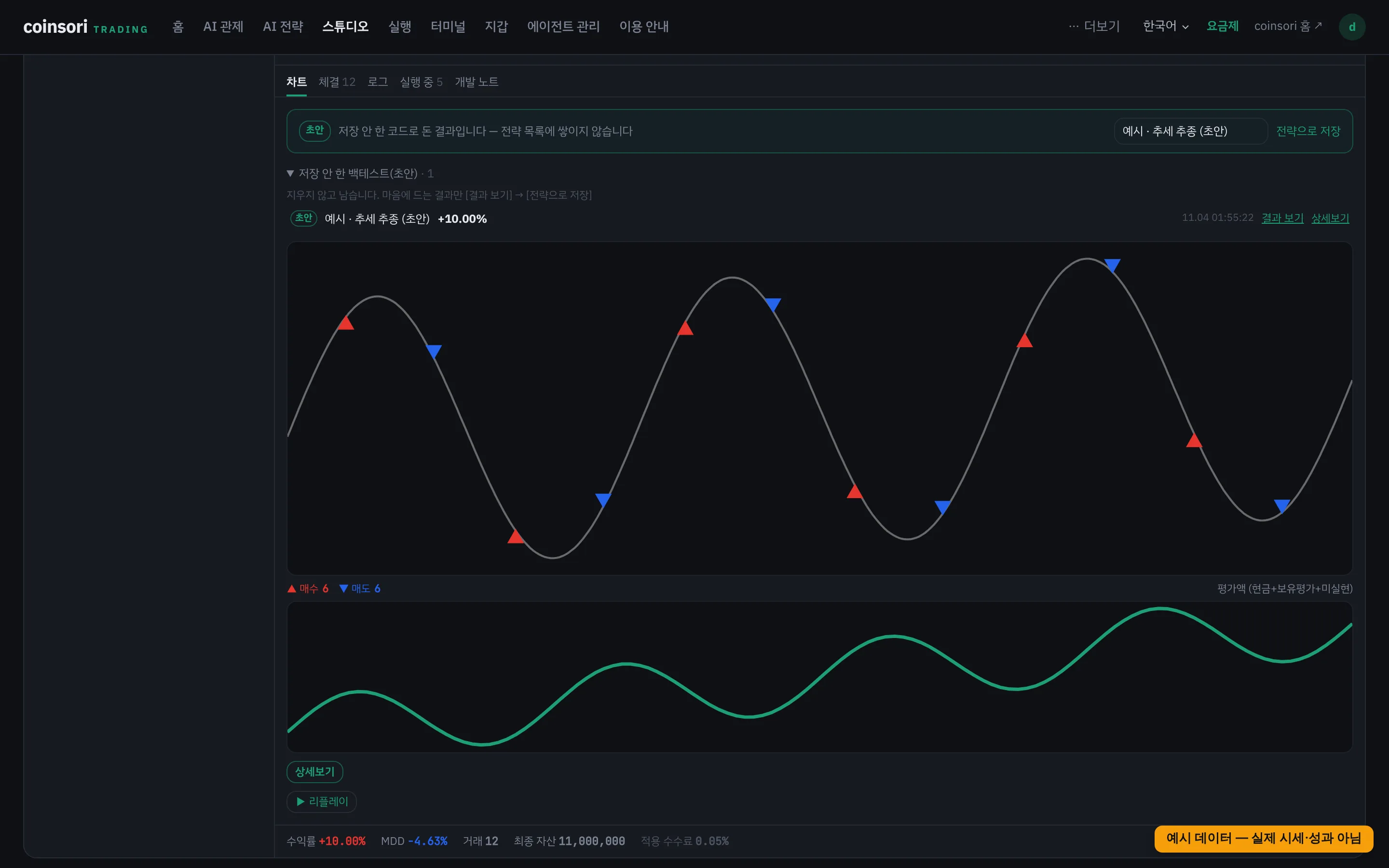
- Return — the result of a past-period test. Never a promise of future profit.
- MDD — the deepest drop from a peak. Be prepared to sit through a drop of that size.
Change the end date and check that other periods look similar — a strategy that only shines in one window is probably luck.
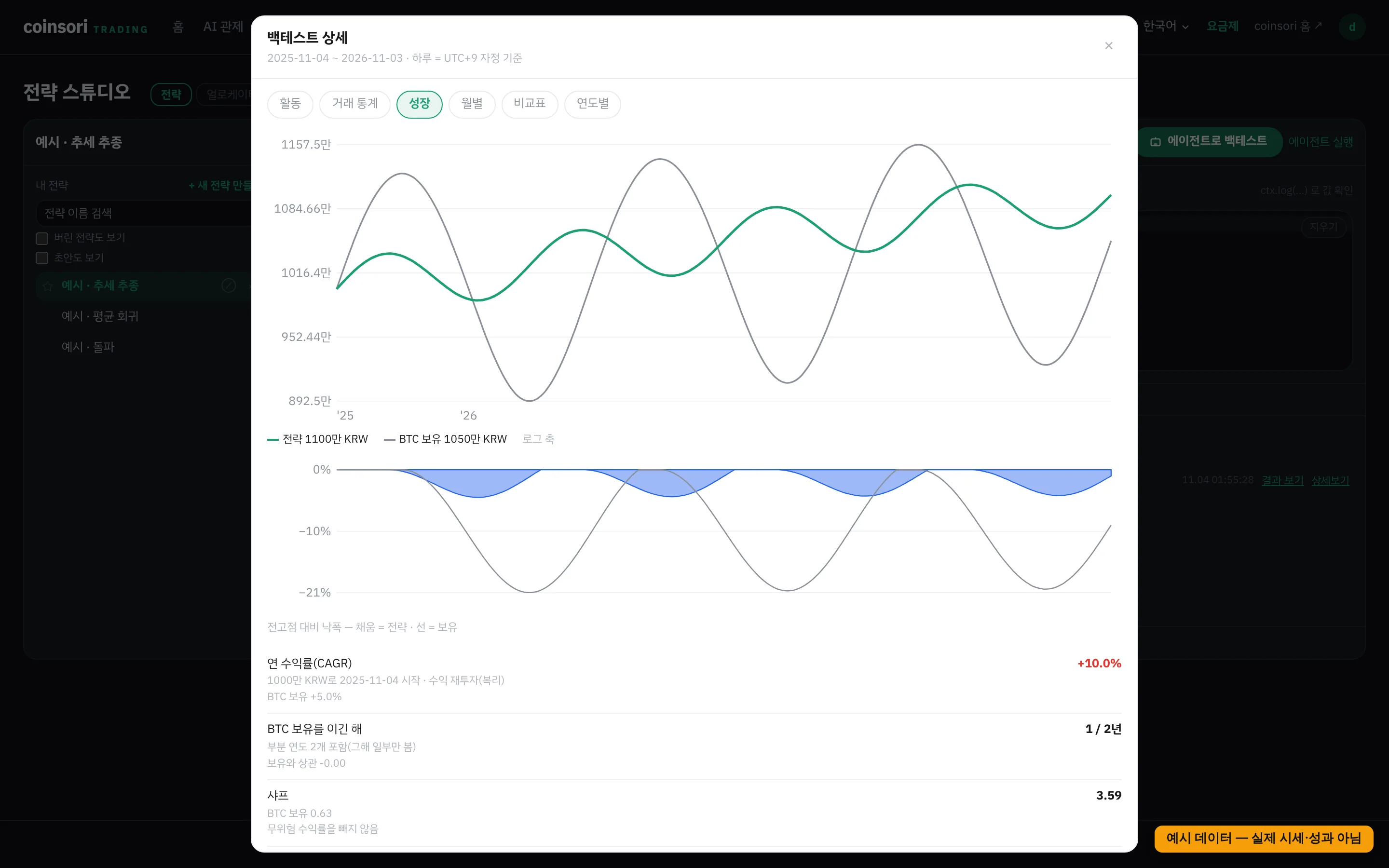
Details on the result card goes deeper: growth and drawdown curves (side by side with simply holding over the same period), a monthly return table, calendar and yearly table, risk stats (volatility, Sharpe, Sortino, Calmar, longest losing stretch) and trade stats (win rate, average win/loss, fees paid). A day is cut at your display timezone. Daily records exist only for results run on agent 1.423.0 or later.
If you plan to start a strategy while already holding the coin, Advanced → Start holding simulates that: it starts with that quantity from the first bar, and returns are measured against cash + quantity × first price (single symbol, spot, code strategies only).
4. Run it on paper
Press Deploy to paper on the strategy card. It runs on the agent from step 1, following live prices with pretend money — none of your funds are used. Watch it on Home (overview) and Runs.
5. Go live when ready
Move on only after days of satisfying paper results. Real orders need all three:
- An exchange API key — register it on your agent in agent management. Create it without withdrawal permission (exceptions and why: Security).
- A wallet size (allocation) — set when you Promote to live in Runs. That amount is the most the strategy can lose.
- Live orders turned on — the agent starts in dry-run, which sends no orders. Turning live orders on is a separate confirmation.
Some futures exchanges need a connection test (order round trip) before the first live run — it checks the order path with a minimum-size real order, so fees or price moves can cost a little. Once your own account passes on mainnet, that account can trade live right away (passing on testnet does not unlock live).
---
Everything below is for when you want to dig deeper.
Paper trading (manual)
Want to practice buying and selling yourself? Use paper in the terminal: virtual funds, real prices and orderbooks, paper wallets on your agent (same wallet structure as live), realistic fees and slippage. Paper runs on the agent too.
Paper and live share the same terminal screen (switch with the toggle on top). Prices, orderbook, trades and the chart (history included) come straight from the exchange through your agent — not from soritrading servers. That is why you can pick symbols we have not collected yet and still see a chart (marked 'Not collected' in the list). The terminal remembers your last market, symbol and side (paper/live) on this device. For forex it picks the MT terminal you used last time (or the only one), and for Korean stocks it fills in your last symbol, then a holding. Opening the live side alone sends no orders — turning live orders on is a separate confirmation.
Paper · simulated live · live — what is the difference
Three names that are easy to mix up.
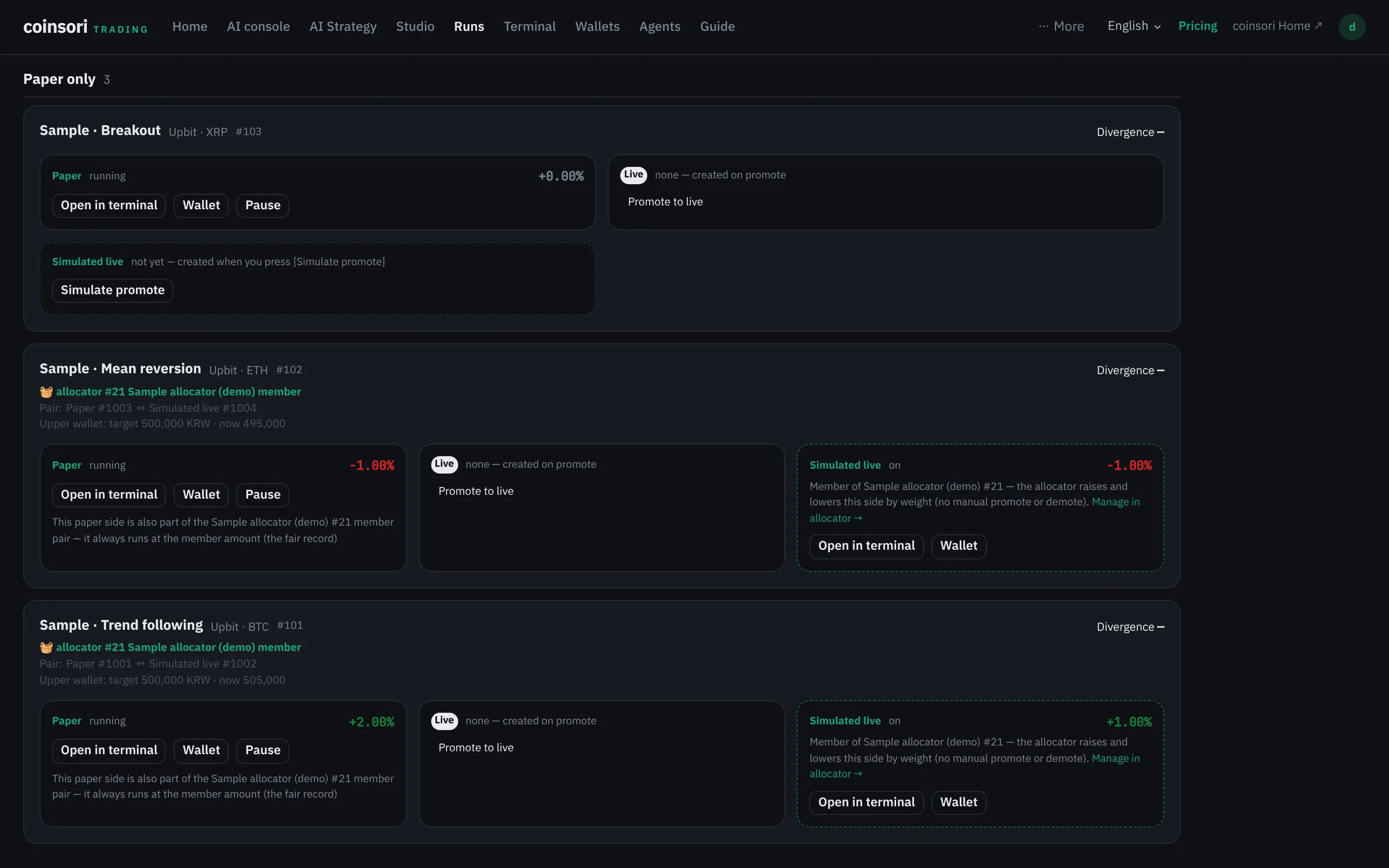
- Paper — pretend money following live prices.
- Simulated live — a pretend-money run that lives exactly like the live side: it starts with an empty wallet, is funded from the allocator's unallocated wallet, and starts with a fresh state when promoted — only the money is fake.
- Live — real money, real orders. It needs a key, a wallet size and live orders turned on, and starts in dry-run, which sends no orders.
| Paper | Simulated live | Live | |
|---|---|---|---|
| Where the money is | Pretend money · a paper wallet on your agent | Pretend money · a wallet in a 'simulated live' account separate from paper | Real money · your exchange account (each run gets a wallet of its allocation) |
| Real orders | No | No | Yes (once live orders are on) |
| What the allocator sees | Not in any allocator — keeps running with the same amount whatever its weight, so it is the fair track record | Looks like a live cell (with a flag saying it is simulated) | A live cell |
| When to use it | Trying a strategy for the first time · building a track record · practising by hand | Going through allocation, promotion and demotion the live way, without real money | When you are ready |
Pair: deploying a strategy gives one pair — a paper side that always runs and an upper side that receives money (live or simulated live). Both get the same prices but keep separate wallets and state.
Why simulated live exists: so a paper allocator deployment behaves the same as a live one. In a paper allocator deployment the upper side is simulated live; in a live deployment it is live. So when a member gets weight 0, the upper side only reduces and then waits once empty, while the paper side keeps running — exactly as in a live deployment. You can also create one without an allocator with Simulate promote on the pair card in Runs (you set the wallet size as an amount). On the wallets screen it shows as an account labelled 'Simulated live'.
On the canvas: in the canvas view of Runs, the brand-colored solid line is money flow (allocator · cell → upper side) and the sky-blue dashed line is the pair (upper side ⇢ the same strategy's paper side). No money moves along a pair line. The allocator itself is explained in the allocator docs.
Writing code yourself
A strategy is a single JavaScript function onUpdate(ctx). The editor has autocompletion, and the full API is in the strategy API docs. Backtest orderbooks are synthesized from candle volatility, so treat slippage as an estimate.
Dev notes — version control for your strategy
Select a strategy in the studio and open the Dev notes tab. Entries from the AI (automated development) and from you stack up in order, and every entry stores the code as of that moment — the timeline IS the version history. Backtest history keeps a per-job code snapshot too.
The three buttons on each entry:
- Code — read-only view of that version. Nothing changes.
- Load into editor — puts that version into the editor temporarily. Your saved strategy is untouched; run a backtest on it right away. It disappears when you switch strategies or reload (temporary until saved).
- Restore this code — overwrites the saved strategy with that version. Use it when the AI broke the code; the restore itself is recorded in the notes, so history never breaks.
In short: just looking = Code, try it = Load into editor, real recovery = Restore.
Live details — wallet vs. returns
A live run only orders inside its wallet (its allocation). Once the wallet is spent nothing more is bought, and the whole wallet is the most that run can lose (it is not a kill switch that stops on a loss — the wallet size itself is the ceiling). Safeguards such as order-rate limits and manual stop still apply.
Returns — a common misreading: a run's return (%) is measured against that run's allocation, not your whole account. With 10M in the account and a 1M allocation, the strategy only works with 1M, so account-wide the gain can look small — that is the allocation, not the strategy. Live runs on the same exchange also share the balance, so if their allocations add up to more than the balance, orders can be rejected for insufficient funds. You can change the allocation later; live runs ask once more before changing it.
Words you may not know yet
If a term above is unfamiliar, look it up here. You can start without knowing them, but please read this before trading with real money.
| Term | What it means |
|---|---|
| Slippage | The gap between the price you asked for and the price you actually got. Buying at market usually fills slightly worse than the quote. The thinner the market, the larger the gap. |
| VPS | A rented computer that stays on 24/7 (from a few dollars a month). Strategies run on your own machine, and closing a laptop stops them — so a VPS is the usual way to run continuously. |
| API key | A pass the exchange issues to a program so it can read balances and place orders. ★ Create it without withdrawal permission — then even in the worst case funds cannot leave the exchange. |
| Caps (guardrails) | Lines set in advance that a runaway strategy cannot cross. The biggest one is the wallet (allocation); order-rate limits and manual stop come on top. |
| Allocation (wallet) | How much money one live run may use. Orders stay inside it, it is the most that run can lose, and its return (%) is measured against it. |
| Dry-run | A mode that simulates orders without actually sending them. A newly connected agent starts in dry-run so you can confirm the setup before enabling real orders. |
| MDD (max drawdown) | The largest peak-to-trough fall in capital. It is the loss you would actually have had to sit through, so it often matters more than the return. |
| Backtest | Running a strategy against past market data. Doing well in the past does not mean doing well next. |
| Non-custodial | It means we never hold your money. Keys and orders stay on your machine, and our servers cannot start a trade. |